
Developed a municipal infrastructure dashboard and QA/QC workflow to help teams review assets, track data issues, and support clearer infrastructure decisions.
Municipal infrastructure teams often work with information spread across asset layers, GIS services, spreadsheets, field observations, and operational records. Without a clear review process, it can be difficult to quickly see where assets are located, which records need attention, and what issues should be prioritized.
This project demonstrates how municipal infrastructure data can be organized into a dashboard-based workflow for asset review, QA/QC tracking, and spatial decision support.
Project Summary
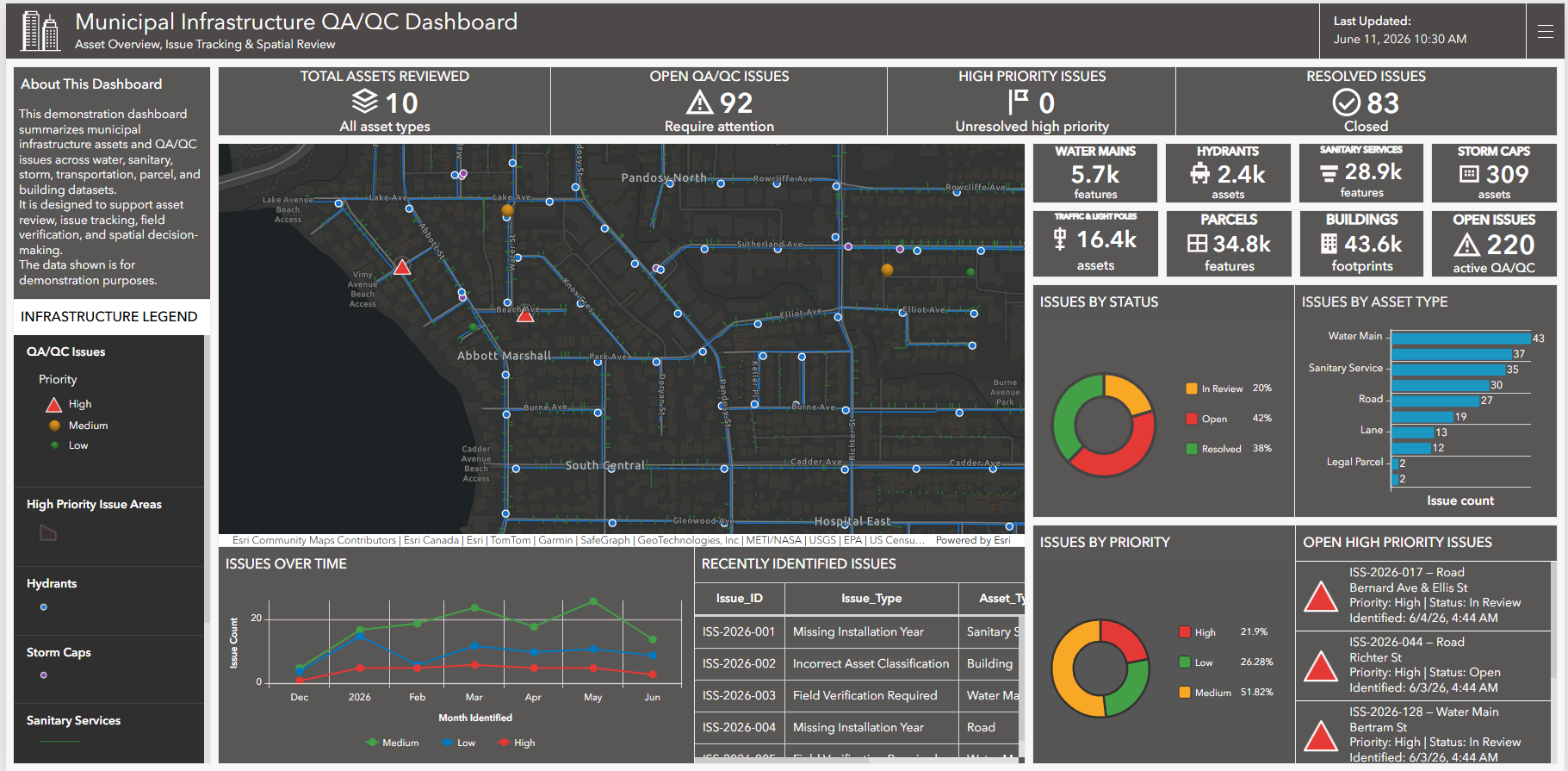
OrbitalIQ developed a demonstration dashboard workflow using municipal infrastructure layers, hosted web maps, and synthetic QA/QC issue records. The project brought together roads, lanes, parcels, building outlines, water mains, hydrants, sanitary services, storm assets, traffic and light poles, and QA/QC issue points into a single interactive ArcGIS Dashboard.
The dashboard allows users to review infrastructure assets, monitor open and resolved QA/QC issues, identify high-priority records, view issue trends, and locate recent issues directly on the map. The workflow shows how static GIS layers can be turned into a practical decision-support tool for asset management, field verification, and data-quality review.
Note: QA/QC issue records were created for demonstration purposes to show how the workflow can support infrastructure data validation and review.
Project Phases
-
Organized municipal infrastructure layers including roads, lanes, parcels, buildings, water mains, hydrants, sanitary services, storm features, and traffic assets. Layers were prepared for web mapping with clean naming, visibility settings, and dashboard-ready symbology.
-
Generated a demonstration QA/QC issue layer with fields for issue type, asset type, priority, status, location, date identified, assigned team, review requirement, and comments. This created a structured issue-tracking layer that could drive dashboard indicators, charts, lists, and tables.
-
Designed a web map that clearly separates operational issues from supporting infrastructure context. High-priority QA/QC issues were emphasized, while buildings, parcels, roads, and asset layers were styled to remain readable without overpowering the review points.
-
Built dashboard widgets for total assets reviewed, open QA/QC issues, high-priority issues, resolved issues, asset summaries, issue status, issue priority, issue trends, recently identified records, and open high-priority issues.
-
Configured list and table interactions so selected issue records can be located on the map through pan, zoom, and flash actions. This helps users move from a summary view to the exact location of a data issue.
-
Municipal infrastructure web map
ArcGIS Dashboard layout
QA/QC issue tracking layer
Asset summary indicators
Issue status and priority charts
Recently identified issues table
High-priority issue list
Dashboard-ready symbology and layer structure
Demonstration workflow for infrastructure data validation and review
Need a clearer way to track projects, assets, field updates, service areas, risks, or program information?
OrbitalIQ Solutions can help turn public-sector data into dashboards, maps, and reporting tools that support practical decisions.